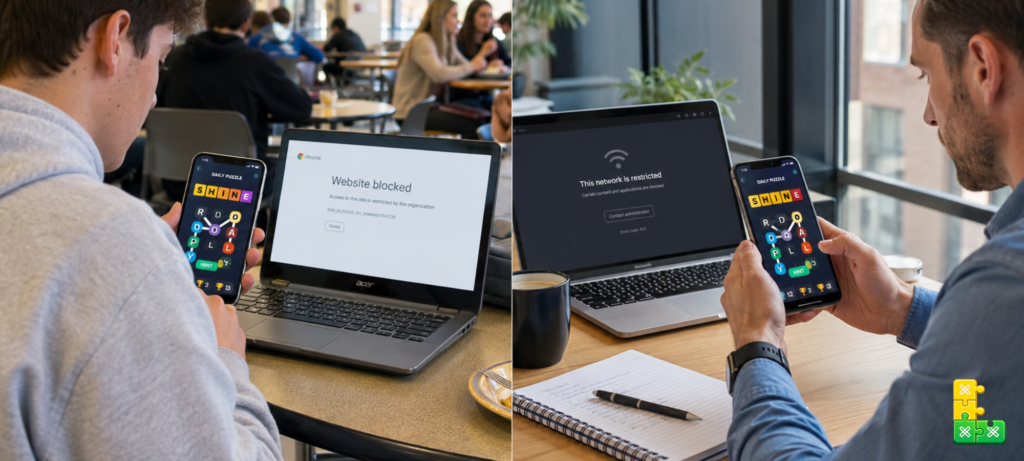
If you have tried to open Letroso during a lunch break and hit a blocked site page, you are not alone. School networks, office firewalls, and public Wi-Fi systems routinely block gaming and entertainment sites. The frustrating part is that Letroso takes less than five minutes to play and is genuinely useful for vocabulary and cognitive skills — but the filter does not care about that.
This guide explains why Letroso gets blocked, what your actual options are for playing it in restricted environments, and how to make the most of the time you have when you do get access.
Table of Contents
- Why Letroso Gets Blocked on School and Work Networks
- How to Play Letroso Unblocked — Your Real Options
- Using a Mobile Data Connection
- Browser-Based Workarounds
- What to Do If You Only Have a Few Minutes
- Playing Letroso Offline
- Why Letroso Is Worth the Effort
- Frequently Asked Questions
- Final Thoughts
Why Letroso Gets Blocked on School and Work Networks
Network administrators use content filtering software to block categories of websites rather than individual URLs. Gaming sites, entertainment platforms, and anything categorized as a distraction typically land on the blocked list by default. Letroso gets caught in this net not because of anything specific about the game but because it falls into the general games and entertainment category that most filters flag automatically.
Some school networks use stricter filtering systems that block any site not explicitly whitelisted. In these environments, even educational tools get caught. Others use category-based filtering where gaming is blocked but educational content is not. Letroso sits in an awkward middle ground — it is unambiguously a game, but it is also a genuine vocabulary and logic exercise that many educators would classify as beneficial.
Work networks tend to be more targeted. Many offices block social media, streaming services, and games during working hours. Letroso’s five-minute daily puzzle is arguably less disruptive than a fifteen-minute social media scroll, but the filter treats it the same.
How to Play Letroso Unblocked — Your Real Options
There are a few legitimate approaches that work in most restricted environments. The right one for you depends on what kind of device you are using and what network restrictions are in place.
Switch to Mobile Data
This is the simplest solution and works in almost every situation. If you have a smartphone with mobile data, your school or work network’s filtering does not apply. Open letroso.org on your phone’s browser using your mobile data connection and the daily puzzle loads without restriction.
The daily Letroso puzzle takes three to five minutes on average. Most players find it fits perfectly into a lunch break or short break between tasks — you do not need a long window to complete it.
If your workplace or school prohibits using personal phones during certain hours, respect those rules and play during actual break time. The streak is worth maintaining, but not at the cost of workplace or school policy.
Use a Different Browser
Some network filters target specific browsers or browser configurations rather than the site itself. If Letroso is blocked in Chrome, try opening it in Firefox, Edge, or Safari. This does not always work, but it costs thirty seconds to try and sometimes bypasses a less sophisticated filtering system.
Try the Site on a Different Network
If your building has both a staff network and a guest network, or both a school network and a separate student network, the filtering rules often differ between them. Ask whether a guest Wi-Fi is available that you can connect to on your personal device during breaks.
What to Do If You Only Have a Few Minutes
One of Letroso’s genuine advantages over similar games is that the daily puzzle does not require a long session. Here is how to play as efficiently as possible when time is limited.
Before you even open the game, decide on your opening word. Do not waste time choosing it once the clock is running. Pick one of these and commit to it: ARISE, STARE, or OATEN for five-letter puzzles, STRAIN or PLANET for six-letter ones. Entering your opener the moment the game loads saves thirty to sixty seconds compared to thinking about it in the moment.
After your opener, read the board immediately. Colors, connection lines between tiles, border states. Spend ten seconds absorbing all three before typing your second guess. Slow reading followed by fast guessing is more efficient than fast reading followed by slow guessing.
If you solve it in three or four guesses, you can usually finish the entire daily puzzle in under three minutes this way. If you get to guess five or six and time is running out, use a power-up. That is exactly what the Hint and Elim options exist for.
For a full breakdown of how to approach each stage of the puzzle efficiently, the best strategies to solve Letroso faster guide covers the whole process.
Playing Letroso Offline
Letroso is a browser-based game that requires an internet connection to load. However, once the page has fully loaded, most modern browsers cache enough of the game that it continues to function if your connection drops briefly mid-session.
This is not the same as true offline play — you cannot load the game fresh without internet. But if you load Letroso before entering a restricted network and keep the tab open, it often continues working throughout your session even on restricted Wi-Fi because the game data is already loaded in your browser cache.
This is not a guaranteed workaround and depends on your browser’s caching behavior, but it is worth knowing about for situations where you have internet access before entering a restricted environment.
Why Letroso Is Worth the Effort
It is reasonable to ask whether Letroso is actually worth navigating restrictions for. Five minutes is a small commitment, but if you are going out of your way to play it, there should be a good reason.
The daily puzzle is a genuine cognitive exercise. Each session requires pattern recognition, working memory, and deductive reasoning — all skills that have documented benefits for mental sharpness. Research highlighted by Harvard Health Publishing on puzzle games and brain fitness consistently shows that regular puzzle solving supports cognitive maintenance over time, particularly for vocabulary recall and processing speed.
Beyond the cognitive benefits, maintaining a daily streak in Letroso builds a habit that most people find genuinely satisfying. The streak counter is a simple metric but it creates real accountability — missing one day resets it to zero, which is enough motivation for most players to make the five-minute effort even on busy days.
The game is also completely free, requires no account, and works on any device with a browser. There are no ads interrupting the puzzle, no premium unlocks required to access the daily mode, and no personal data required to play. For a daily habit, it is about as low-friction as it gets.
Frequently Asked Questions
Why is Letroso blocked at my school? Most school networks use content filtering that blocks sites categorized as games or entertainment. Letroso falls into this category automatically regardless of its educational value. The simplest workaround is playing on your phone using mobile data during a break.
Can I play Letroso on a school Chromebook? If your school Chromebook is managed by the school’s Google admin, it may be subject to the same content filtering as the school network. Using mobile data on a personal device is the most reliable alternative.
Does Letroso work on a phone? Yes. Letroso is fully browser-based and works on any modern smartphone browser. The interface adapts to smaller screens and the keyboard input works normally on touchscreen devices.
Is using a VPN to unblock Letroso allowed? This depends entirely on your institution’s acceptable use policy. Many schools and workplaces explicitly prohibit VPN use. Check your institution’s policies before using a VPN on any network you do not own.
Can I play Letroso without WiFi? Letroso requires an internet connection to load. Mobile data works as a substitute for WiFi. Once the game is loaded, brief connection interruptions usually do not affect the session.
Will I lose my streak if I can’t play for a day? Yes. Missing a day resets your streak to zero. If you know you will not have access for a day, the best approach is to play on mobile data during a short break rather than skipping entirely.
Final Thoughts
Getting blocked from Letroso at school or work is a common frustration, and the fix is usually simpler than people expect. Mobile data is the most reliable solution, works in almost every situation, and does not require any special technical knowledge.
The daily puzzle takes five minutes. It fits into a lunch break, a commute, or any short window of downtime. If maintaining your streak matters to you, that five-minute investment is almost always findable somewhere in the day.
Head to letroso on your phone right now and play today’s puzzle. If you are new to the game and want to understand the full mechanics before your first daily attempt, the How to Play Letroso beginner guide is the best starting point.